

Back to work

Software Product Case Study

CalStudio

CalStudio is a cloud-based application for calibration lab management. Designed for end-to-end performance, CalStudio makes it easy for calibration labs to manage customer requests, write procedures, and complete jobs with confidence.

My Role

Contributed to the CalStudio MVP by working on competitor research, requirements analysis, workflow design, screen design, and interaction details for the LIMS in collaboration with a Senior UX Designer and Product Manager.

Timeline

Feb 2024 - Nov 2025

Platform

Cloud Calibration Software

Methods

Competitor Research, Requirements Analysis, Workflow Design

Collaboration

Worked with Senior UX Designer and Product Manager

Overview

A new software product for complex calibration lab work.

CalStudio is a cloud-based calibration lab management application by Fluke Calibration. It combines lab management, procedure authoring and execution, and workflow management into one platform.

My work focused on the Lab Management area, where I helped define workflows, study domain patterns, and completely design the management system settings, along with barcode scanning and filtering data-heavy views.

Because CalStudio was built around multiple connected product areas, the work required understanding how lab operations, procedure execution, and workflow management fit together.

3-in-1

lab management, procedure authoring, and workflow tools

MVP

public release in Nov 2025

5

core UX decisions for Lab Management clarity

Who It’s For

Technician persona

Technician

Lab Manager persona

Lab Manager

Metrologist persona

Metrologist

Built for lab teams where technicians, lab managers, and metrologists all touch the same data but need completely different views.

CalStudio was designed for technicians, lab managers, and metrologists who all work with the same operational data in completely different ways.

Multi-role

One interface that adapts to different responsibilities

Dense data

Tables and statuses that stay readable at scale

Accuracy

Precision workflows that reduce calibration errors

Workflow

Connected task flows from asset to certificate

What Made This Complex

Calibration lab teams work across assets, work items, procedures, due dates, technicians, and operational statuses. The challenge was to turn these interconnected lab activities into workflows that felt understandable for new users while still supporting dense operational data. They also handle large volumes of information, so the experience had to present that data without becoming complicated or confusing.

Contribution

Took ownership of assigned LIMS workflows and screens from requirements understanding to design execution

Studied competitor products to identify relevant UI patterns for lab management and calibration workflows

Designed selected LIMS sections, including settings, asset barcode scanning, and large data filtering

Worked closely with a Senior UX Designer and Product Manager to align design decisions with product and domain requirements

Design Decisions

Turning niche lab operations into clear product workflows.

Each decision translated calibration lab complexity into clearer screens, interactions, and data workflows.

Structure Lab Management from early requirements

ProblemCalStudio was a new product, so the Lab Management experience needed a clear workflow foundation before screens could become useful.

DecisionI studied calibration lab requirements and translated early inputs into structured Lab Management flows that could support real work.

The product experience had a clearer base for users moving through lab operations.
Use domain patterns instead of generic SaaS assumptions

ProblemCalibration lab management is a niche software domain, so generic SaaS assumptions were not enough.

DecisionI analyzed competing lab management tools to identify useful components, patterns, and interaction expectations that fit calibration work. That research pushed the UI toward denser operational tables, clearer status labels, and filter-first layouts instead of generic dashboard chrome.

The screen work was grounded in domain behavior rather than generic dashboard conventions.

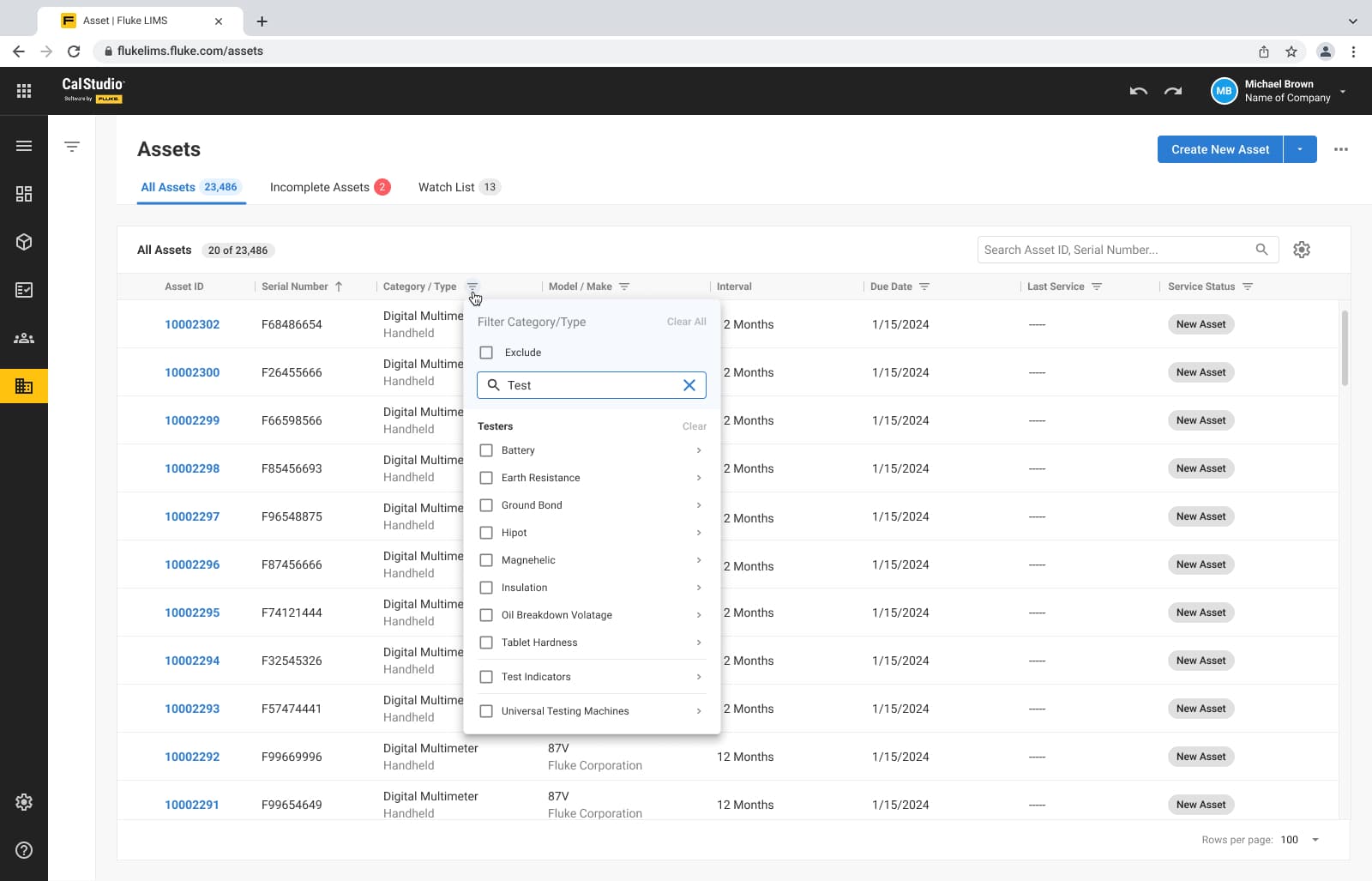
Make large operational datasets easier to filter and act on

ProblemLab teams work with dense operational and asset data that can become difficult to scan or act on.

DecisionI created filtering patterns that helped users narrow large data sets, review status quickly, and act with less friction.

Users could scan, compare, and work with complex lab data more efficiently.

Connect physical asset handling with digital workflows

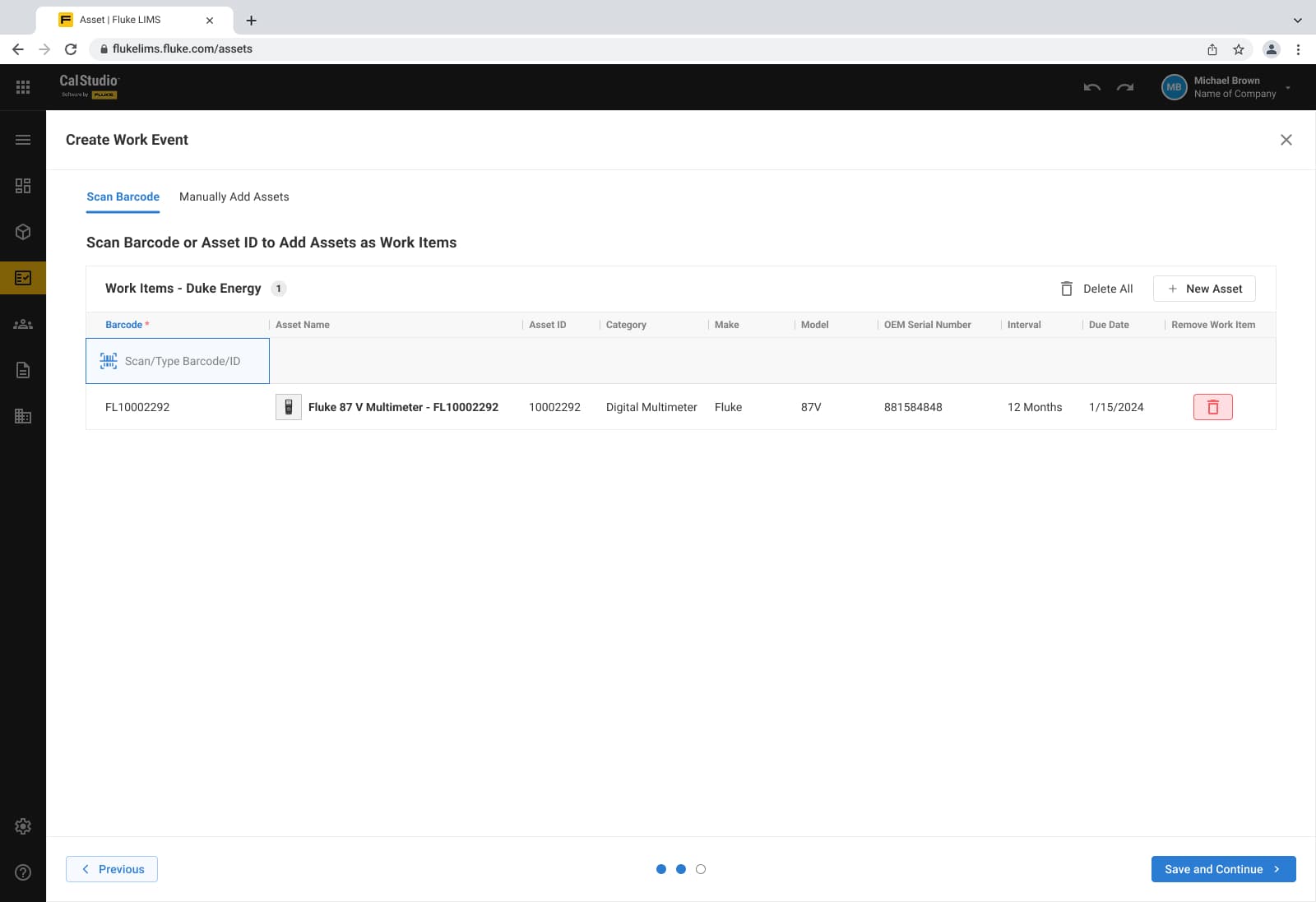
ProblemLab teams need software that supports day-to-day setup, asset handling, and job execution inside one connected product. Barcode scanning mattered because it reduced manual lookup and kept physical assets tied to the right work item and status.

DecisionI designed workflows and screens for areas such as settings and asset barcode scanning within the Lab Management experience.

Core operational tasks could live inside the broader CalStudio platform instead of feeling disconnected.

Roles & Permissions

ProblemCalibration software requires broader and deeper settings than most SaaS tools because labs need to configure many domain-specific operational details.

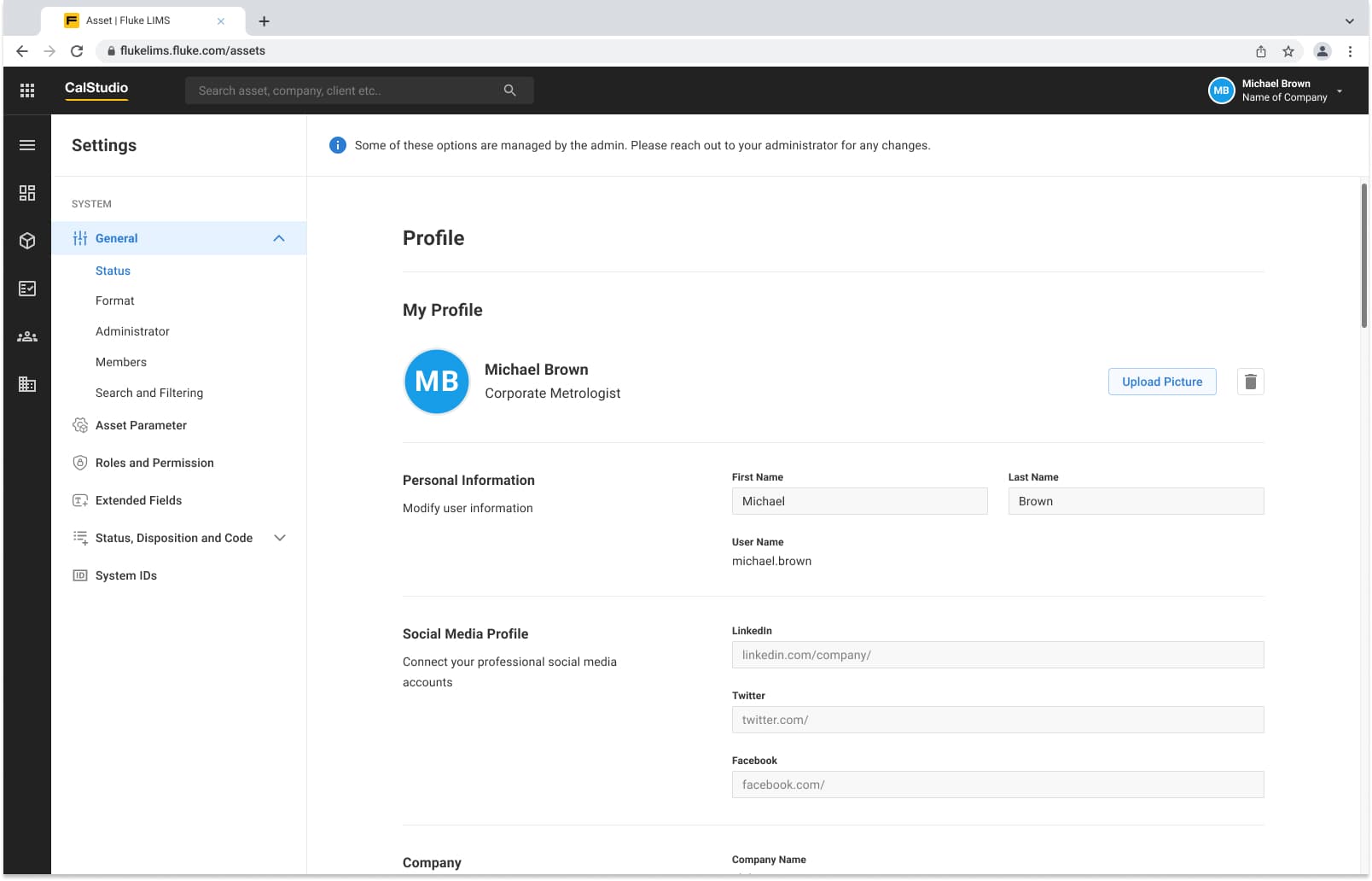
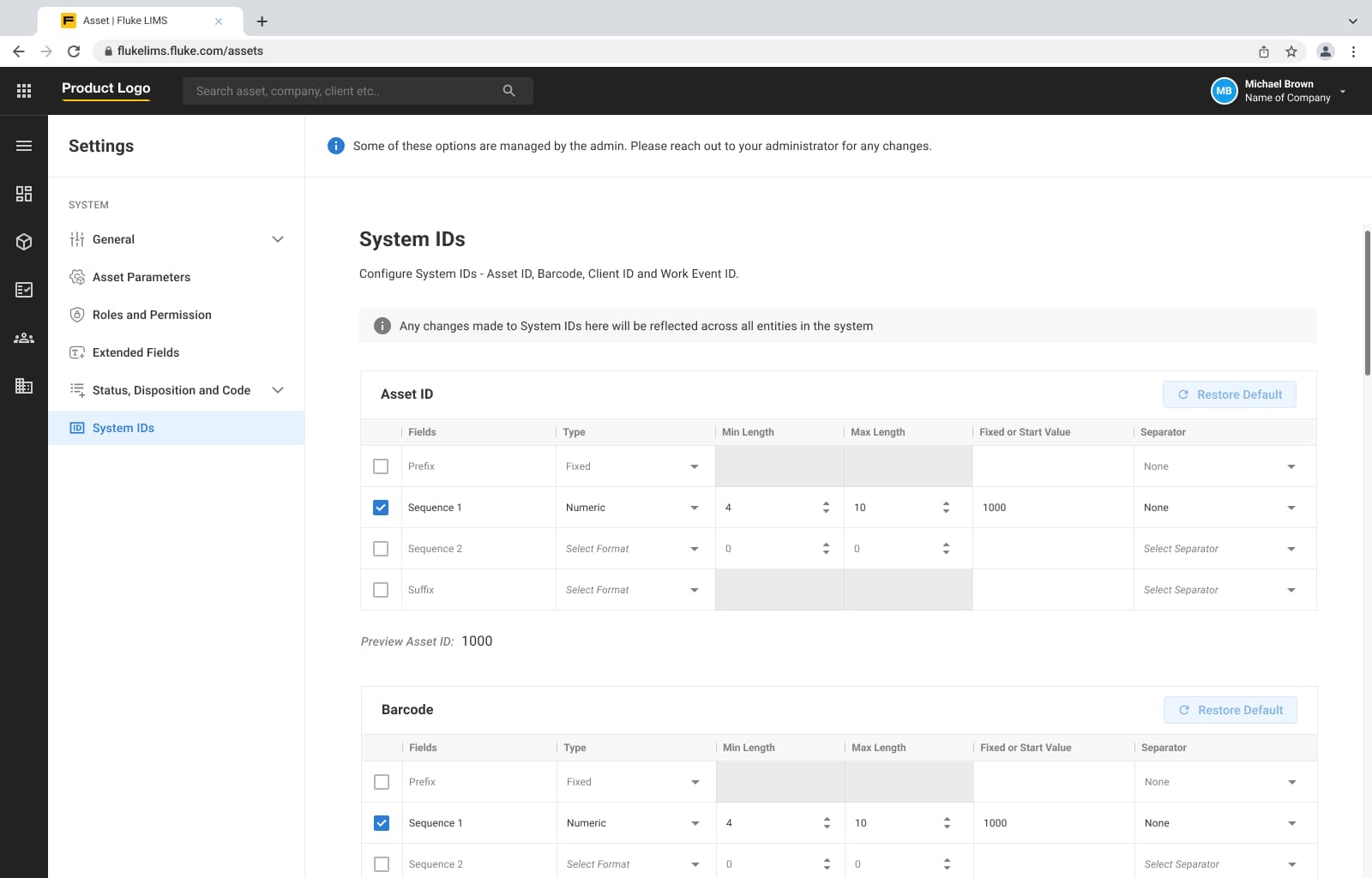
DecisionI took complete ownership of researching settings requirements and translating them into a clear UI structure for LIMS settings. Instead of a one-off screen, I shaped a generic settings pattern that could handle calibration complexity while remaining easy to navigate.

The settings UI pattern was reusable and strong enough that other projects could adopt the same approach with minimal rework.

Improve navigability using usability-testing feedback

ProblemDuring prototype testing, users reported navigation friction in a few LIMS areas, especially when moving between setup, assets, and activity-related screens.

DecisionI worked with feedback collected by the summer intern and researcher, then passed those findings back into the design cycle to refine screen structure, flow clarity, and interaction cues in difficult navigation paths.

The refined flows were easier to navigate, and overall user feedback for the LIMS prototype remained positive with strong ratings during testing.

LIMS Areas I Contributed To

LIMS areas I contributed to

I worked across selected LIMS workflows within the CalStudio MVP, contributing to screens, flows, and reusable interaction patterns across asset setup, settings, access management, and operational tracking. Since the LIMS module had several connected parts, my focus was to translate dense product requirements into clearer interface structures that could support day-to-day lab operations.

Product navigation & system components

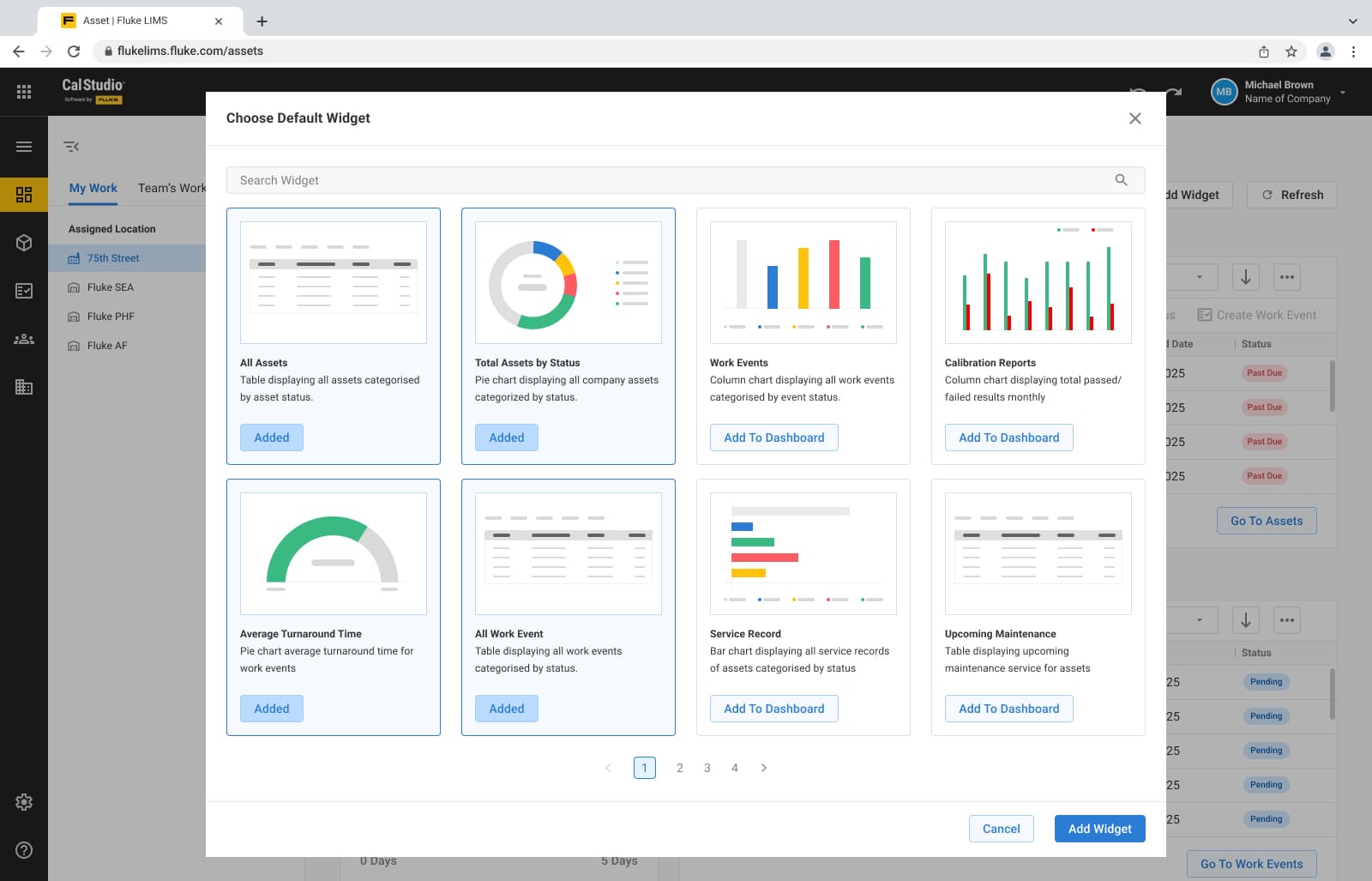
Designed supporting application patterns such as the dashboard, navigation bar, bulk actions, side panels, error pages, and reusable UI components that helped create a more consistent product experience.

Asset setup & configuration

Worked on asset-focused workflows including asset import, barcode scanning, asset location configuration, and related setup screens that helped users bring assets into the system and manage them accurately.

Settings & access management

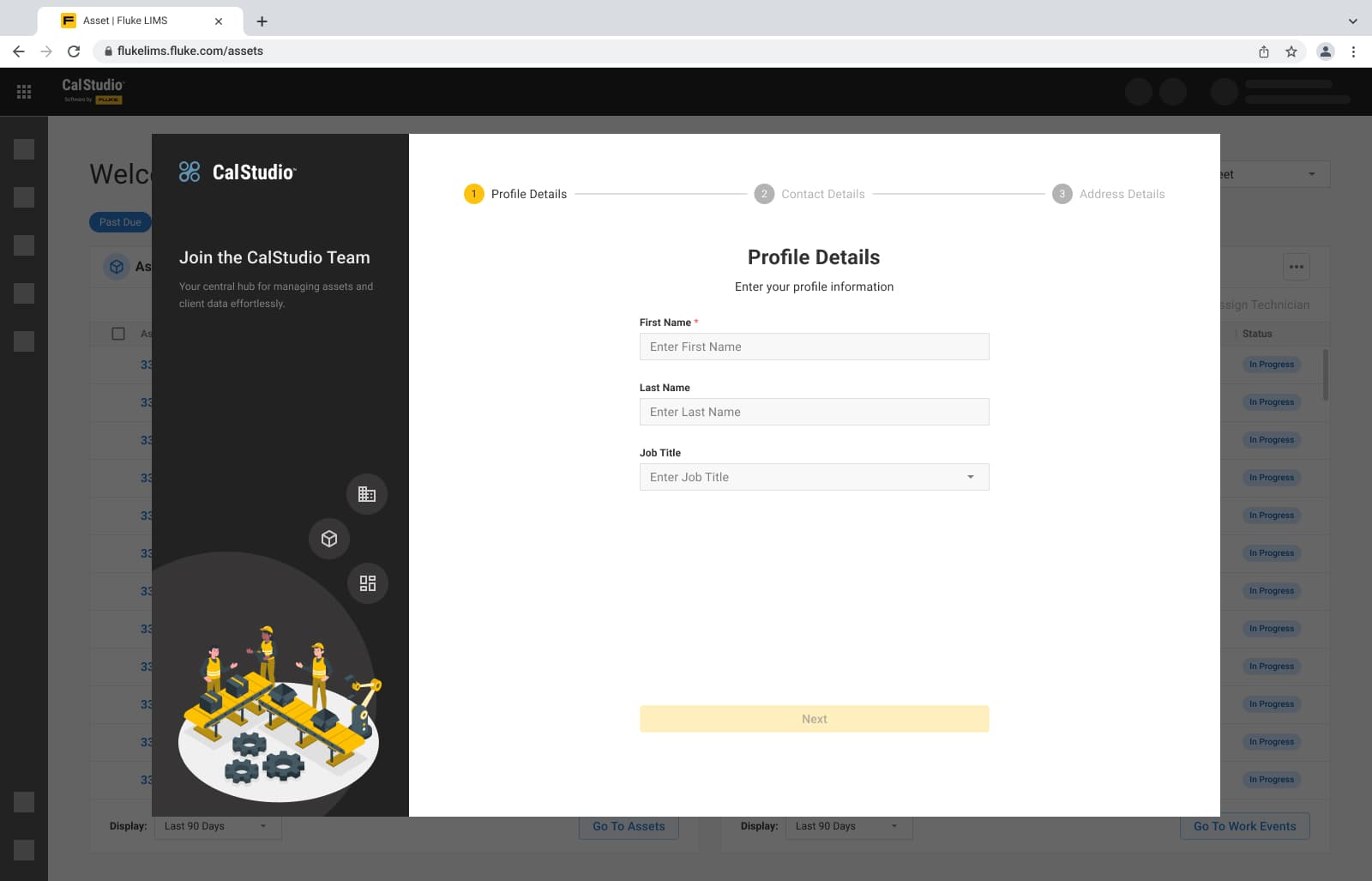
Contributed to global settings, organization-level settings, roles and permissions, member invitations, and onboarding flows that supported how teams configure the system and manage user access.

Work activity & client context

Designed screens for notes, client contact details, and work event list views to help users capture context, review updates, and track activity around lab operations.

Product Visuals

CalStudio asset list screen with quick search for faster asset discovery.
CalStudio barcode workflow screen for managing asset scanning and related actions.
CalStudio dashboard screen showing operational tracking and lab activity overview.
CalStudio onboarding screen for guiding new users through initial setup.
CalStudio LIMS settings screen showing calibration management configuration options.
CalStudio system ID settings screen for defining and managing system identifiers.

Iteration

Because calibration is a niche domain, the design process required continuous feedback and refinement. I worked with the Senior UX Designer, Product Manager, and subject matter expert to clarify technical terms, workflow rules, and operational edge cases before finalizing the UI.

This helped me move beyond requirement-based screens and design interfaces that better matched how lab teams configure settings, manage assets, and review work activity.

What made iteration necessary

Unclear requirements

Some workflows needed deeper clarification before they could be translated into screens.

Domain-specific rules

Calibration terms, lab operations, and system logic had to be understood before making UI decisions.

Feedback-led refinement

Screens were refined through SME and product feedback to better support real lab workflows.

Usability Testing

Usability testing for LIMS was supported by a summer intern and a researcher. Feedback from these sessions was passed back to the designer to refine screens and improve areas where users found navigation difficult.

Overall feedback for LIMS was positive, and the application received a good user rating during the prototype testing phase.

Process, Outcome, Reflection

Process, outcome, and reflection in one compact finish.

A short wrap-up keeps the story moving and makes the last section easy to scan.

Process

Built domain understanding by learning calibration concepts, lab workflows, and LIMS expectations through discussions with the Senior UX Designer and Product Manager.

Studied competitor products and translated early requirements into selected Lab Management flows, UI screens, and reusable interaction patterns.

Outcome

Contributed to the CalStudio public MVP launched in November 2025 by designing selected LIMS workflows across settings, asset management, barcode scanning, filtering, and operational data review.

Helped shape a more structured Lab Management experience that could support complex lab operations without overwhelming users.

Reflection

This project taught me that niche enterprise software cannot be designed from generic SaaS patterns alone.

Before designing screens, I had to understand calibration language, user roles, operational dependencies, and the way lab teams move between setup, assets, and work activity.