Back to work

Personal UX Case Study

JobJournal

Designing a unified workspace for job seekers to track applications, plan interviews, and manage next actions without disconnected tools.

My Role

This was a self-initiated UX concept where I independently shaped the product direction, mapped key job-seeker workflows, designed the interface, and built an interactive prototype to communicate the experience.

Timeline

Jan 2025 - Mar 2025

Platform

Web product concept

Methods

Workflow mapping, empathy mapping, journey mapping, UI design

Deliverable

Interactive Figma concept prototype

Overview

One product for a fragmented job-search journey.

JobJournal addresses a common breakdown: users track applications in one place, plan interviews in another, and manage follow-ups elsewhere. The result is missed context and rising mental load.

My work focused on shaping a clear workflow where status, timeline, and action are tightly connected.

The design direction aimed to make daily progress visible in seconds, so users could spend less time organizing information and more time preparing for the right opportunities.

Contribution

Defined product scope, navigation architecture, and core workflow model.

Translated research artifacts into key product decisions and screen priorities.

Designed high-fidelity dashboard, applications, and calendar experiences.

Aligned status language, interaction patterns, and hierarchy for daily repeat use.

Who It’s For

Active job seeker

Active Job Seeker

Multi-role applications

Built for job seekers juggling multiple applications, interviews, and follow-ups without losing momentum.

JobJournal was designed for active job seekers applying to many roles at once, switching between interviews, resume versions, and deadlines across disconnected tools.

Organization

Keeps resumes, dates, and contacts in one place

Focus

Surfaces what needs attention right now

Momentum

Visual progress that keeps motivation up

Clarity

Next actions visible without digging through tabs

Design Process

Shows the process from empathize and define to design and testing.

01

Empathize

Mapped day-to-day job-search behaviors and frustrations from real workflow patterns.

02

Define

Framed fragmentation as the core problem: status, timeline, and action were disconnected.

03

Ideate

Explored ways to connect tracking, planning, and follow-through in one product loop.

04

Design

Built dashboard, applications, and calendar concepts with consistent interaction patterns.

05

Testing

Used scenario walkthroughs and feedback to tighten clarity and next-step visibility.

User Scenarios

Two realistic workflows this concept is designed for.

High-volume applicant managing active pipelines

Context: A user is applying to many roles each week and needs one place to see stage, follow-up timing, and upcoming interview tasks.

Pain point: Status notes are split between spreadsheets, inbox threads, and calendar reminders, causing missed follow-ups and duplicate applications.

How JobJournal helps: JobJournal combines status pipeline, reminders, and upcoming events so the user can quickly decide what needs action today.
Candidate balancing interview prep, referrals, and resume variants

Context: A user is preparing for interviews at different companies while tailoring resumes and tracking referral conversations.

Pain point: Resume versions, referral contacts, and prep tasks are scattered, making it hard to stay interview-ready for each role.

How JobJournal helps: JobJournal keeps each application connected to prep tasks, timeline context, and role-specific resume notes in one workflow.

Research

Problem framing, empathy mapping, and journey mapping were used to define the core friction points and prioritize what the product needed to solve first.

These artifacts helped separate surface-level complaints from root causes, especially around fragmented tracking, delayed follow-ups, and resume version confusion.

Users lose track of where they applied and when to follow up.

Resume tailoring is repetitive and disconnected from the application flow.

Status anxiety increases when updates are spread across many tools.

Interview preparation starts too late when reminders are not tied to event timelines.

Empathy Map

Captures what users say, think, feel, and do while managing multiple applications.

Says

  • I've applied to so many jobs, I can't remember which ones.
  • I should follow up, but I don't know when.
  • Every job needs a slightly different resume.
  • I hope I didn't miss an email.

Thinks

  • Am I applying the right way?
  • Is my resume good enough for this role?
  • Why hasn't anyone replied yet?
  • I need to stay organized, but it's exhausting.

Feels

  • Motivated when starting out
  • Overwhelmed after multiple applications
  • Anxious while waiting for responses
  • Discouraged after rejections
  • Relieved when things are organized

Does

  • Searches for jobs across multiple platforms
  • Saves job links and screenshots
  • Edits resumes repeatedly
  • Checks email frequently
  • Maintains spreadsheets or notes inconsistently

Journey Map

Maps Discover, Apply, Track, and Respond stages to reveal pain points and opportunities.

Discover

Steps

  • Decides to look for a new job
  • Explores roles and companies

User Actions

  • Browses job portals
  • Saves interesting job postings
  • Reviews resume

Pain Points

  • Jobs scattered across platforms
  • No single place to save or organize roles
  • Unclear starting point

User Thoughts

  • "Where should I start?"
  • "Am I ready for this role?"
  • "I need to update my resume."

Opportunities

  • Central job discovery & saving
  • Clear onboarding to guide the search

Touchpoints

  • Job boards (LinkedIn, Indeed, company sites)
  • Browser bookmarks
  • Notes apps

Apply

Steps

  • Shortlists jobs
  • Applies to multiple roles

User Actions

  • Copies job descriptions
  • Tailors resume
  • Submits applications

Pain Points

  • Repetitive resume edits
  • Hard to remember where and how they applied
  • Time-consuming process

User Thoughts

  • "Did I already apply to this job?"
  • "I should tailor my resume for this role."
  • "This is taking a lot of time."

Opportunities

  • Resume tailoring within the workflow (AI/manual)
  • Auto-save job + resume version used

Touchpoints

  • Job portals
  • Resume documents (PDF/DOC)
  • Email confirmations

Track

Steps

  • Monitors application status
  • Waits for responses

User Actions

  • Checks email frequently
  • Updates spreadsheets or notes
  • Tries to recall follow-ups

Pain Points

  • No reminders for follow-ups
  • Scattered status updates
  • Anxiety from uncertainty

User Thoughts

  • "It's been weeks, should I follow up?"
  • "Which resume did I use for this role?"
  • "I hope I didn't miss an email."

Opportunities

  • Application dashboard
  • Status tracking & reminders
  • Timeline view of progress

Touchpoints

  • Email inbox
  • Spreadsheets / trackers
  • Calendar

Respond

Steps

  • Receives interview invites or rejections
  • Takes next actions

User Actions

  • Schedules interviews
  • Prepares documents
  • Updates application status

Pain Points

  • Poor interview preparation flow
  • No place to reflect or learn
  • Emotional burnout

User Thoughts

  • "How do I prepare for this interview?"
  • "What should I improve if I didn't get selected?"

Opportunities

  • Interview prep tools
  • Reflection notes per application
  • Clear closure for each job

Touchpoints

  • Email
  • Calendar
  • Notes / prep materials

Competitive Analysis

I compared JobJournal with common tools users already rely on to understand where a unified workflow creates clearer value.

Huntr

Tracking: Strong pipeline tracking and reminders

Interview: Limited interview planning depth

Resume: Basic attachments, limited version context

Follow-ups: Good follow-up nudges

Integration: Focused tracker; less connected daily workspace

Teal

Tracking: Good application organization

Interview: Light interview timeline support

Resume: Resume tools are stronger than trackers

Follow-ups: Moderate follow-up support

Integration: Powerful features but can feel split across areas

Notion templates

Tracking: Flexible but manual setup

Interview: User-defined and inconsistent

Resume: Manual linking to external files

Follow-ups: Depends on custom template quality

Integration: Flexible system but heavy maintenance overhead

Spreadsheets

Tracking: Fast manual logging

Interview: No native interview context layer

Resume: Manual file naming and version tracking

Follow-ups: Manual formulas or ad hoc reminders

Integration: Low integration across actions and planning

LinkedIn saved jobs

Tracking: Good for discovery and bookmarking

Interview: No interview planning workflow

Resume: No resume version management

Follow-ups: No structured follow-up management

Integration: Useful entry point, weak end-to-end process support

JobJournal differentiators

Unifies application status, interview timeline, and next actions in one loop.

Connects interview events with preparation tasks instead of treating them as separate tools.

Supports role-level resume version thinking alongside application tracking.

Design Decisions

Four decisions that shaped the experience.

Connect tracking, planning, and action in one loop

ProblemUsers were switching between spreadsheets, calendars, and notes with no shared context.

DecisionI designed JobJournal as one connected workspace where dashboard, applications, calendar, and reminders support one continuous loop instead of separate task silos.

The experience reduces app-hopping and keeps users focused on progress and follow-through.

Make application status the center of control

ProblemWithout quick status visibility, users miss updates and duplicate effort.

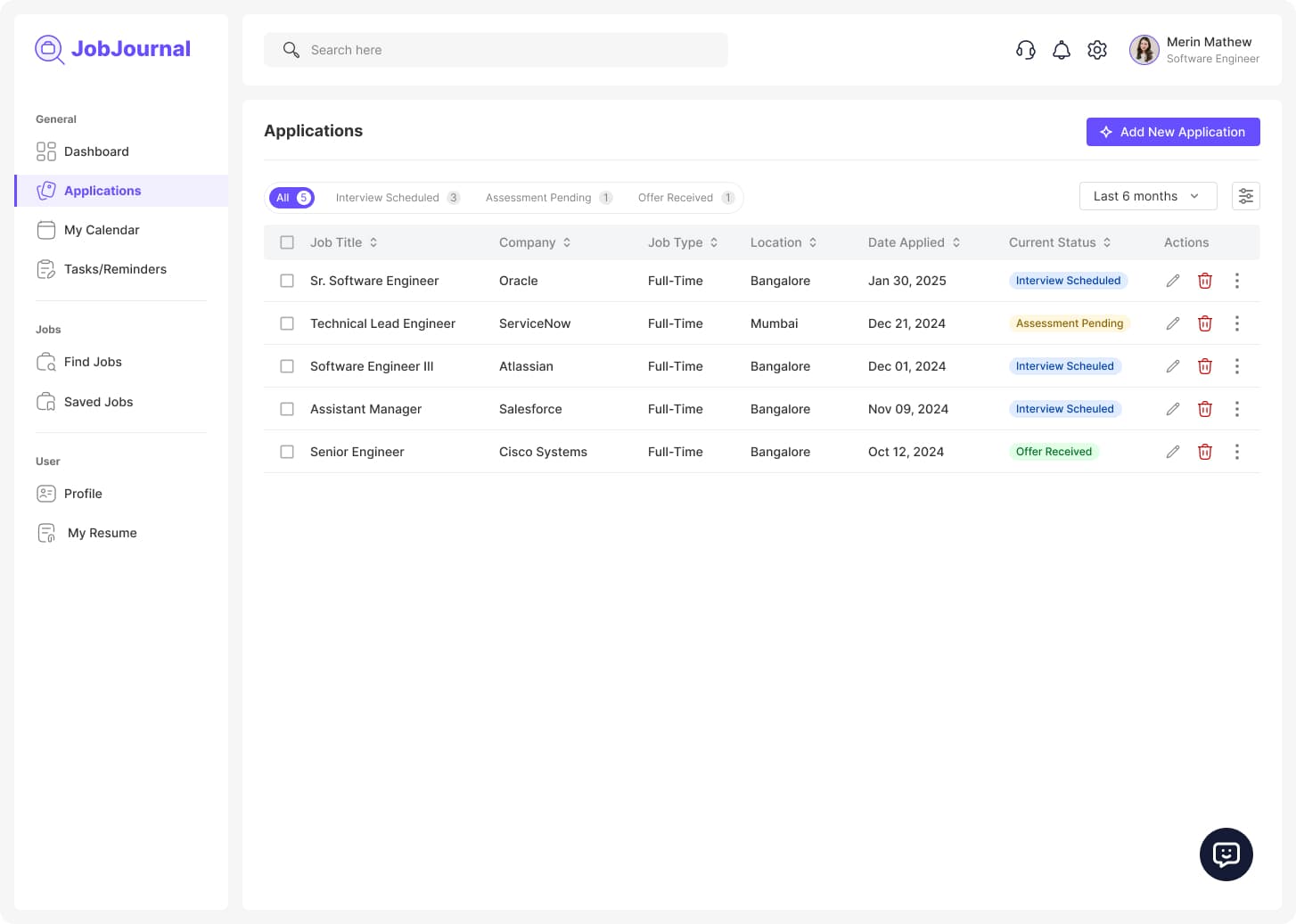
DecisionI used a pipeline-first applications table with clear stage labels, filters, and row-level actions so users can quickly update progress and see what needs attention.

Users can scan progress quickly and update their pipeline with less effort.

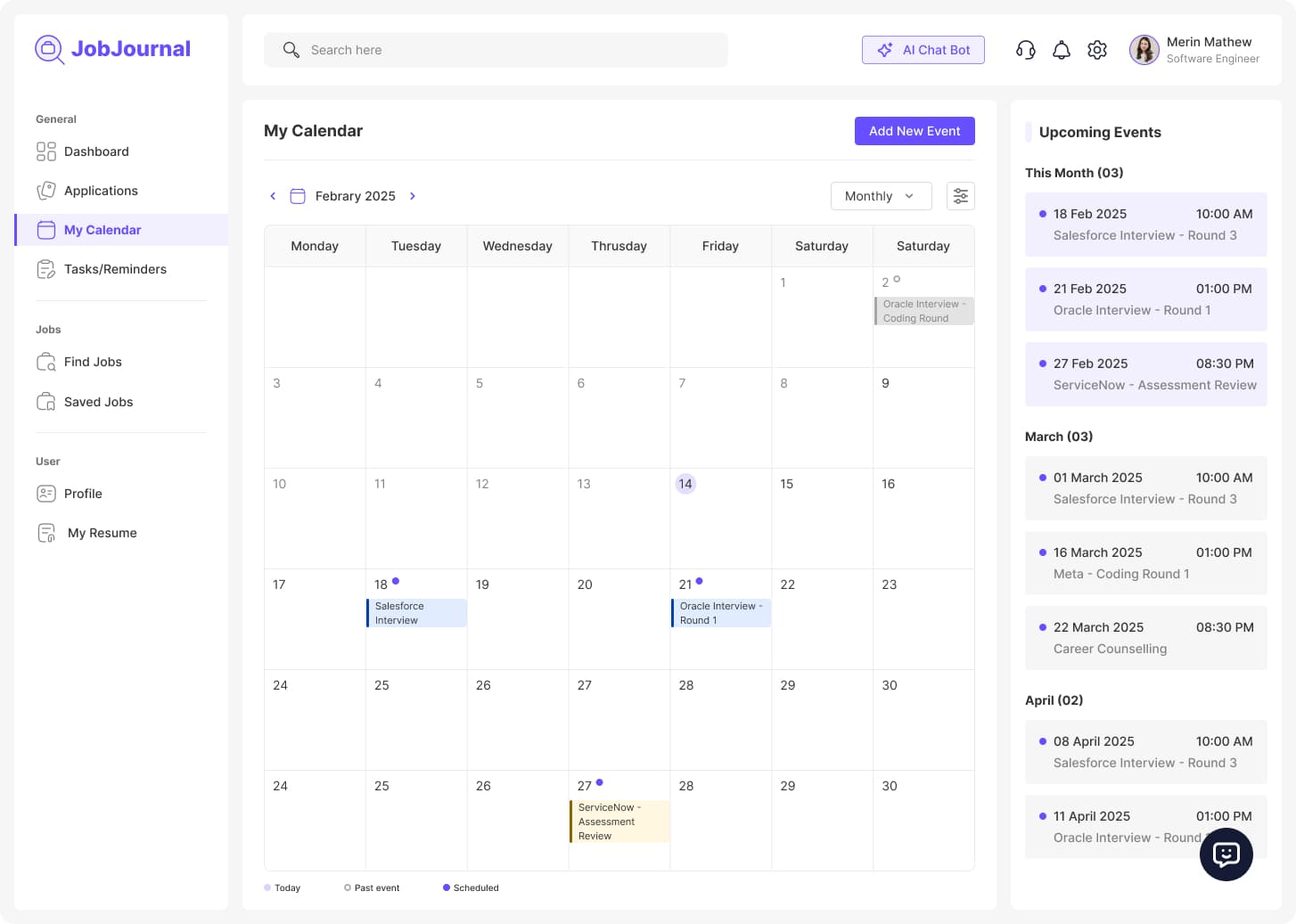
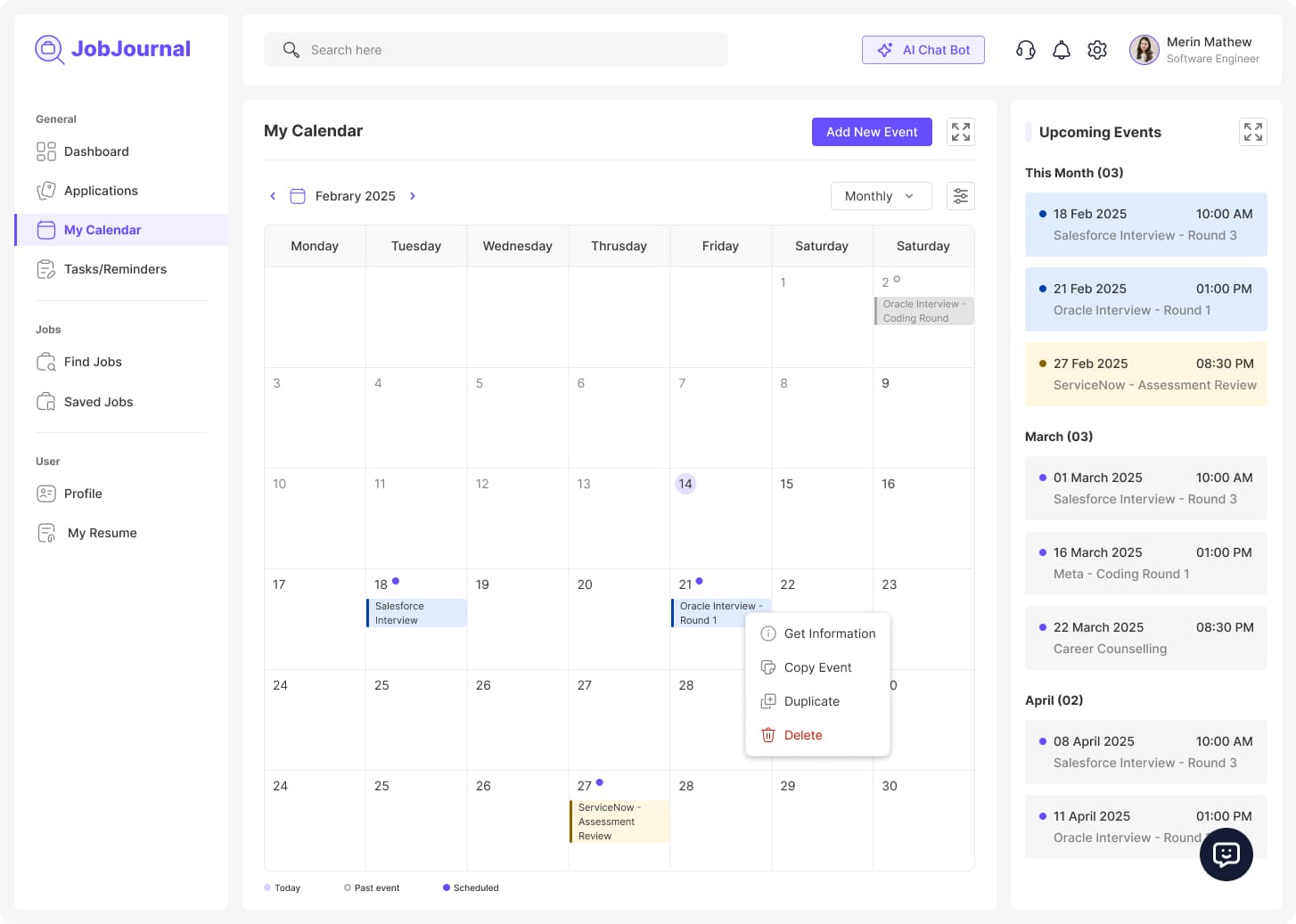
Turn calendar into an interview planning surface

ProblemDate-only calendars do not carry enough interview context for decision making.

DecisionI added event previews, event actions, and date-slot shortcuts for tasks and reminders, keeping planning and execution in the same context.

Interview preparation is easier to manage directly from the timeline.

Prioritize dashboard hierarchy for daily clarity

ProblemUsers need immediate answers on current status and next actions when they log in.

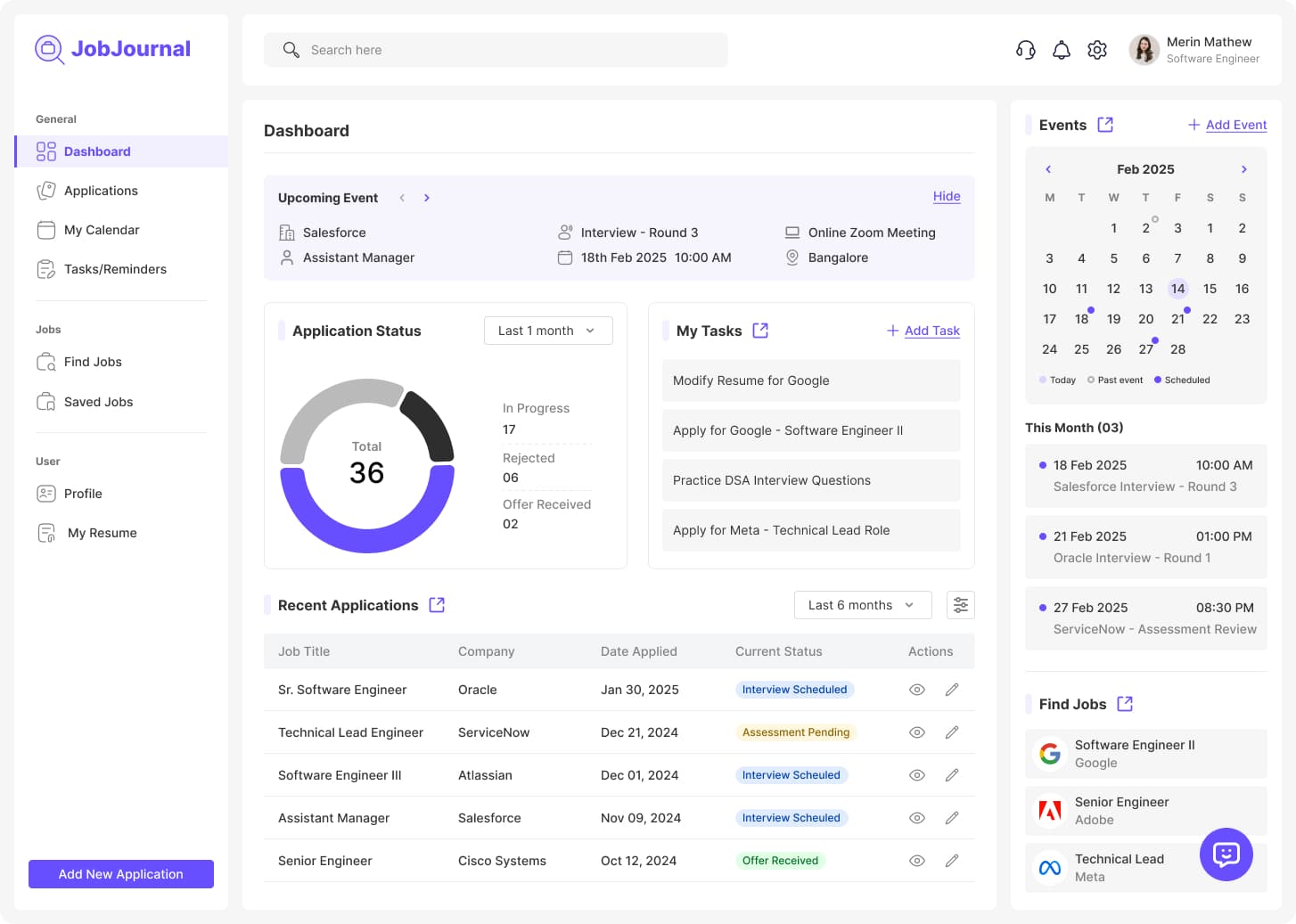
DecisionI prioritized status distribution, upcoming events, active tasks, and recent applications in one snapshot with a top-down reading order for fast scanning.

The dashboard gives fast orientation and stronger day-to-day planning confidence.

Product Visuals

JobJournal dashboard with application status chart, tasks panel, upcoming events calendar, and recent applications table.
Applications table showing job title, company, status badges, and actions for tracking job pipeline progress.
Monthly calendar layout with interview events and an upcoming events panel on the right.
Event detail tooltip card on calendar showing role, date/time, location, and meeting mode.
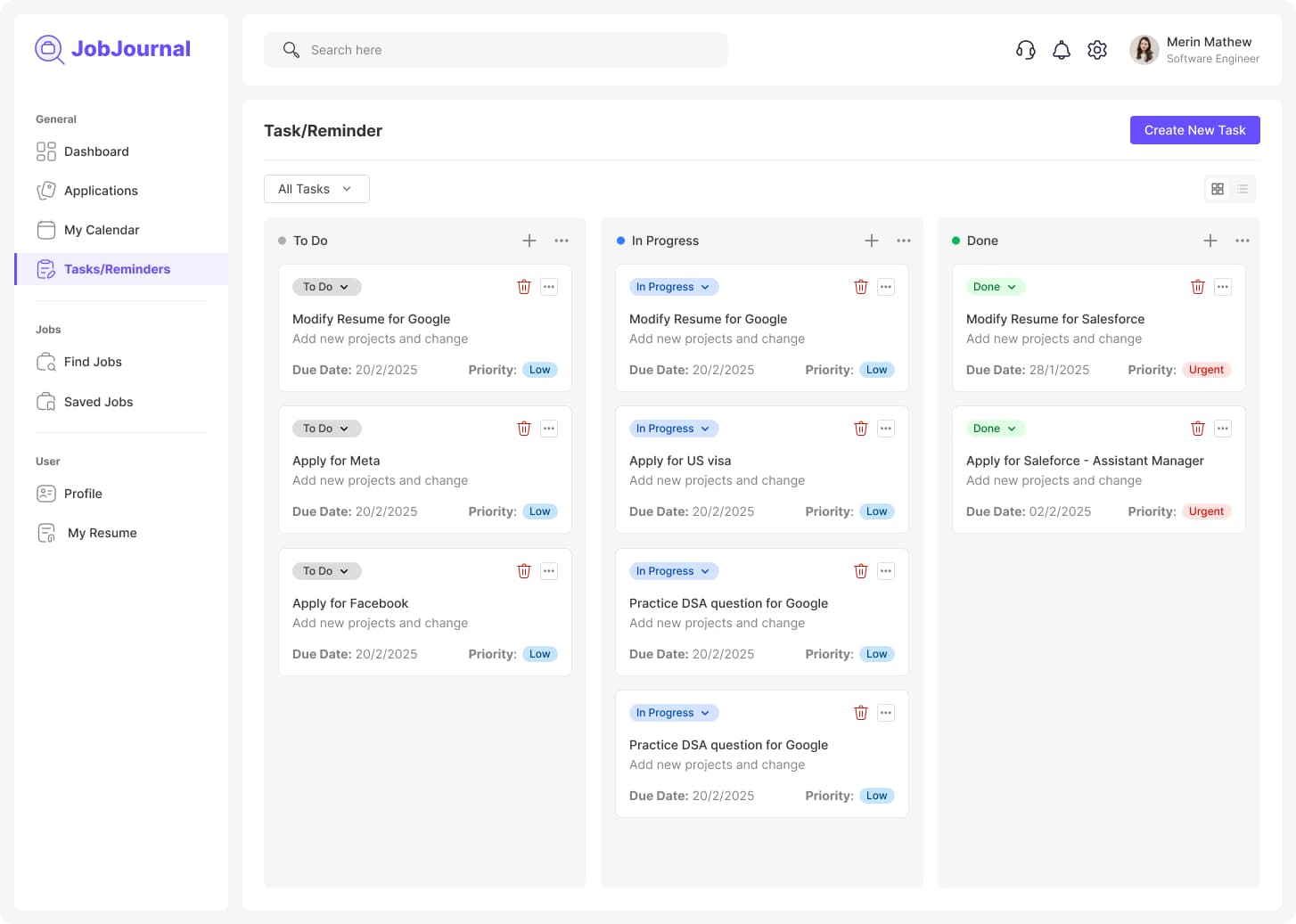
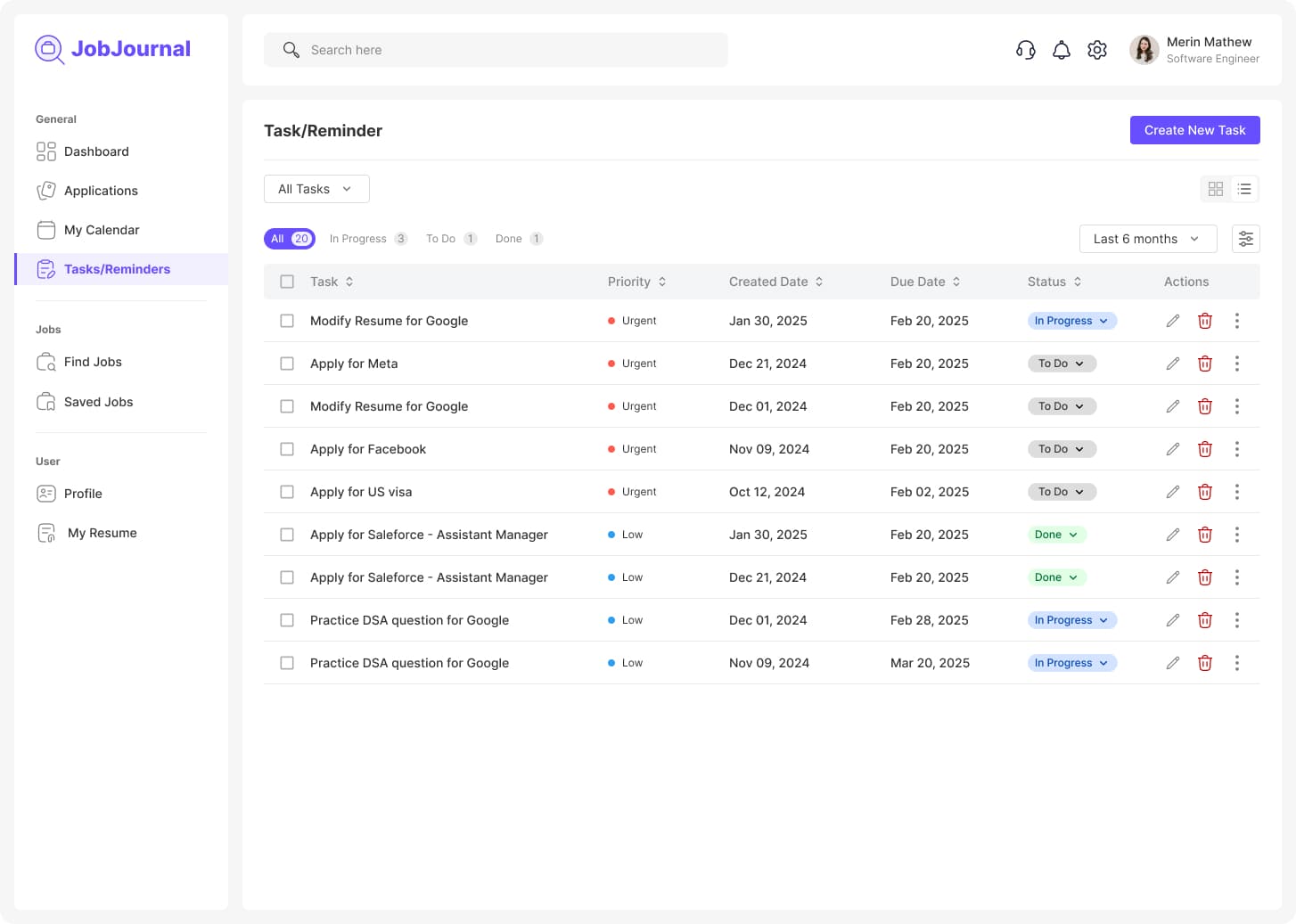
Task and reminders view showing categorized tasks and interview preparation actions.
Reminder management screen showing upcoming follow-ups and scheduled reminders.

After Feedback

Scenario walkthrough feedback highlighted where users needed stronger action clarity. These updates improved day-to-day usability.

Status clarity and follow-up visibility

Before: Users had to infer next actions from generic status labels, and follow-up timing was easy to miss.

After: Status stages were refined and tied to explicit follow-up prompts so users can see next steps immediately.

Calendar context for interview readiness

Before: Calendar entries only showed date-level information, which forced users to open separate notes for interview details.

After: Event detail previews now show role, company context, and meeting mode directly in the calendar flow.

Workflow fragmentation between applications and tasks

Before: Applications and preparation actions felt disconnected, so planning and execution happened in different places.

After: Task and reminder actions are now integrated with application and calendar touchpoints to reduce context switching.

Edge Cases

The concept also accounts for less ideal job-search scenarios that can disrupt momentum if not handled explicitly.

Rejection tracking and reflection notes

Each rejected application can store a short reflection and outcome reason so users can learn patterns and improve future applications.

Ghosting and no-response follow-up windows

If no response is received within a target window, the workflow surfaces a follow-up reminder and keeps the application visible in attention queues.

Multiple resume versions per role

Applications can reference role-specific resume variants so users avoid sending the wrong version and can compare outcomes by variant.

Referral tracking and handoff status

Referral records include who referred, when they referred, and whether outreach needs another follow-up before interview stages.

Process

I moved from empathy and journey mapping into focused UI decisions for the highest-frequency workflows, then used scenario walkthroughs to refine clarity and action sequencing.

Outcome

The result is a cohesive high-fidelity concept for a unified workspace across dashboard, applications, and calendar, with research-backed structure and interaction consistency.

Reflection

This project strengthened my ability to convert emotional user friction into concrete interaction and hierarchy decisions while keeping the product lightweight and practical.